AI Tools
Webflow vs Cursor vs Replit (2026) for Marketing Sites
Should you switch your Webflow stack to Cursor or Replit? Compare CMS, SEO, and AI workflows to see why Webflow remains the best home base for marketing teams.

Anil Choudhary
AEO Technical Associate

Should Your Webflow Agency Switch to Cursor or Replit?
Many Webflow teams are asking if they should:
Stick with Webflow as their main marketing stack
Replace it with Cursor, Replit, or other AI-first tools
Or run a hybrid setup
This guide focuses on marketing and content-led sites, not complex apps.
Short answer for busy teams
Keep Webflow as the base for most marketing, brochure, and content sites.
Use Cursor or Replit as satellites for app-like features, prototypes, and dev workflows.
Avoid fully rebuilding a stable Webflow marketing site in a raw code/AI stack unless you truly need app-level complexity.
Webflow vs Cursor vs Replit (Quick comparison)
Scenario / Need | Webflow | Cursor | Replit |
|---|---|---|---|
For non-technical marketers | Visual CMS and on-page editor; safe to use. | Code-first; devs needed for most edits. | Dev-centric; no marketer-friendly CMS. |
Hosting & deployments | Built-in hosting, CDN, SSL, forms, SEO UI. | You must set up hosting, CI/CD, envs. | Handles hosting, but as a code project you own. |
SEO & AEO structure | Native meta, open graph, sitemaps, CMS fields. | All custom; depends on your implementation. | Mixed; AI can scaffold, but no CMS-style SEO UI. |
Complex app-like features | Great for embeds and light apps; limited for deep logic. | Strong for complex, stateful apps. | Strong for full-stack experiments and tools. |
AI & dev workflow | Webflow AI for layout/content, plus external tools. | Deep AI assistant inside the IDE. | AI website builder + agents for code-heavy teams. |
Why Webflow is still home base
What Webflow gives your team
Lets designers and marketers ship full sites without React or framework code.
Reduces day-to-day dependency on engineering for content and layout changes.
Bundles hosting, CDN, forms, basic analytics, CMS, and ecom in one stack.
How it helps non-technical teams
Visual editor plus class-based styling model for responsive layouts.
CMS collections that non-technical editors can update safely.
No Git, CLI, or complex deployment steps for publishing content.
When Webflow is usually the best choice
Small to mid-sized SaaS, agency, and product marketing sites.
Content-heavy sites with blogs, resources, and landing pages.
Teams where marketers need to move fast without dev involvement every week.
Where Cursor fits (and where it breaks down)
What Cursor does well
Code-first, AI-augmented IDE for React, CSS, and full apps.
Generates and edits code from prompts, speeding up dev workflows.
Allows raw CSS and fine-grained control that many developers prefer.
Design and interactions vs Webflow
Webflow:
Visual styling tools, layout controls, and component-style classes.
Native Interactions and animation panels, including GSAP-style setups.
Cursor:
Relies on prompts and Agent Mode to create interactions.
Works fine for simple animations, but complex motion often needs manual refinement.
Responsiveness and layout
Strength: AI can quickly apply responsive fixes via prompts.
Benefit: Good quality responsiveness without manually tweaking every breakpoint.
Tradeoff: Still requires a developer mindset to validate and adjust the generated code.
Weak points for marketing sites
No native CMS for non-technical editors.
No built-in SEO UI; everything is implemented in code.
No integrated “one-click” deployment; you must manage hosting and CI/CD.
Where Replit fits (and why replacing Webflow is risky)
What Replit is great for
AI website builder and agents that generate front-end and back-end from prompts.
Single environment for code, hosting, and collaboration.
Powerful for prototypes, internal tools, MVPs, and dev-heavy teams.
Why it’s not a straight Webflow replacement
No marketer-first visual CMS or structured editor.
SEO, sitemaps, redirects, and schema need manual design and maintenance.
Every change touches a codebase that must be owned and maintained over time.
Risks of moving a marketing site from Webflow to Replit
Rebuilding:
Components and layout system
CMS logic and content modeling
SEO structure, redirects, performance tuning, and deployment pipelines
Higher ongoing overhead for routine content updates.
More reliance on devs or prompt engineering for changes marketers handle today.
When to keep Webflow and layer AI on top
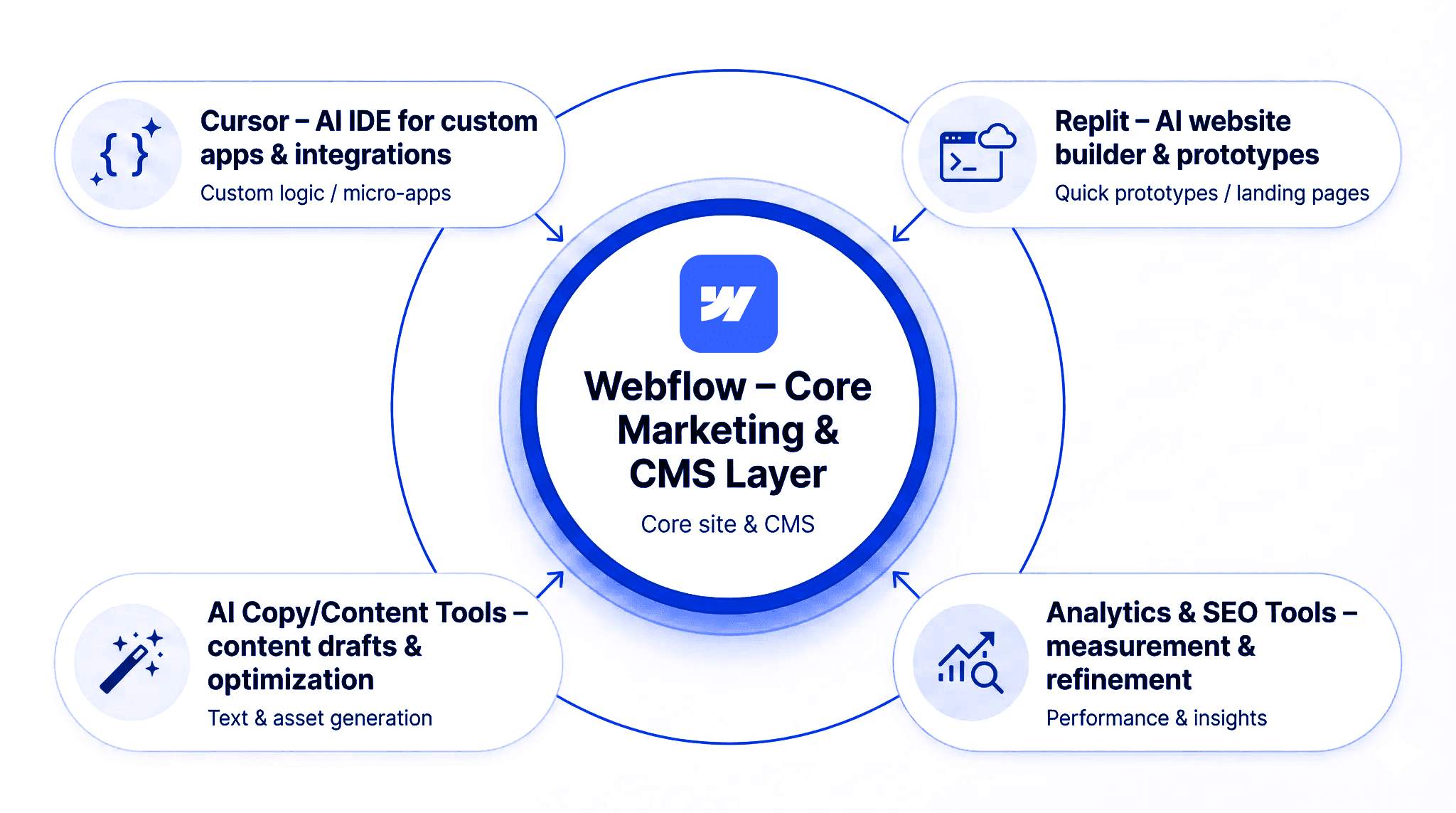
Webflow vs cursor vs replit
Best-fit strategy for most Webflow agencies
Keep Webflow as the core marketing and content hub.
Use AI tools and dev IDEs around it instead of replacing it.
Practical hybrid patterns
Use Cursor (or other AI IDEs) to:
Build micro-apps or dashboards and embed them into Webflow.
Create custom integrations and back-end logic.
Use Replit to:
Prototype new product ideas or internal tools quickly.
Test app concepts before committing to full production stacks.
Use Webflow AI and external LLM tools to:
Generate sections, layouts, and content drafts.
Speed up CMS population and content optimization.
Outcome you want
Marketers stay fast and independent inside Webflow.
Developers get modern AI-assisted workflows for the genuinely complex parts.
You avoid needless migrations that hurt SEO, UX, and content velocity.
KEEP READING
Keep reading

SEO & AEO
How to Add WebMCP to a Webflow Form (And How to Test It)
A practical guide to adding WebMCP to a Webflow form, with the code, the origin trial setup and a testing checklist

SEO & AEO
Schema Markup & AI Citations: What Studies Show
Discover if schema markup improves AI citations and SEO rankings. Recent Ahrefs, Search Atlas & Google data reveal the truth on structured data for AEO, GEO, and search visibility in 2026

AEO as an Agency Service: How to Package, Price, and Sell
AI visibility is becoming a client conversation agencies can't avoid. Here's how to build AEO into a service you can actually deliver at scale, not just report on.